Sending Email To Gmail SMTP Code with ASP.NET Core MVC

Sending Email To Gmail SMTP Code with ASP.NET Core MVC

11 August 20222 min readWeb Programming

We use the email sending process frequently in any web application. Sending mail with ASP.NET Core MVC is really simple. What we need to do is add class to Models folder and add controller to our controllers folder. After writing a few code, our process will be finished.

We add Email class to the models folder.

namespace onurtaskiran.Models
{
    public class Email
    {
        public string To { get; set; }
        public string Subject { get; set; }
        public string Body { get; set; }

    }
}

we use the "System.Net.Mail" namespace. Yes don't forget to add it.


using Microsoft.AspNetCore.Mvc;
using onurtaskiran.Models;
using System.Net.Mail;

namespace onurtaskiran.Controllers
{
    public class MailController : Controller
    {
        public IActionResult Index()
        {
            return View();
        }

        [HttpPost]
        public IActionResult Index(Email em)
        {
            string to = em.To;
            string subject = em.Subject;
            string body = em.Body;
            MailMessage mm = new MailMessage();
            mm.To.Add(to);
            mm.Subject = subject;
            mm.Body = body;
            mm.From = new MailAddress("onurtaskiran@gmail.com");
            mm.IsBodyHtml = false;
            SmtpClient smtp = new SmtpClient("smtp.gmail.com");
            smtp.Port = 587;
            smtp.UseDefaultCredentials = true;
            smtp.EnableSsl = true;
            smtp.Credentials = new System.Net.NetworkCredential("onurtaskiran@gmail.com", "password");
            smtp.Send(mm);
            ViewBag.message = "Your email has been sent successfully";
            return View();
        }
    }
}

Include the HTML page in our project and edit it as in the code

@model onurtaskiran.Models.Email

@{
    ViewData["Title"] = "Index";
    Layout = "~/Views/Shared/_Layout.cshtml";
}

<h4>Email</h4>
<hr />
<div class="row">
    <div class="col-md-4">
        <form asp-action="Index">
            <div asp-validation-summary="ModelOnly" class="text-danger"></div>
            <div class="form-group">
                <label asp-for="To" class="control-label"></label>
                <input asp-for="To" class="form-control" />
                <span asp-validation-for="To" class="text-danger"></span>
            </div>
            <div class="form-group">
                <label asp-for="Subject" class="control-label"></label>
                <input asp-for="Subject" class="form-control" />
                <span asp-validation-for="Subject" class="text-danger"></span>
            </div>
            <div class="form-group">
                <label asp-for="Body" class="control-label"></label>
                <textarea asp-for="Body" class="form-control" rows="3" cols="15"></textarea>
                <span asp-validation-for="Body" class="text-danger"></span>
            </div>
            <div class="form-group">
                <input type="submit" value="Send Email" class="btn btn-default" />
            </div>
            <h5>@ViewBag.message</h5>
        </form>
    </div>
</div>

You may get gmail security errors. Does not allow your Gmail account to be used by an external application. If you want to send mail, you must disable secure application access.

Upgrade

Upgrade

17 July 20221 min readCinema

This movie is one of my favorite movies. I watched last night.I don't know why I didn't watch it when it first came out. A very, very good movie. I strongly recommend you to watch. Logan Marshall-Green performed well. That man is similar to Tom Hardy. I think this two men very good stars.

The film shows what can be done with artificial intelligence. Can artificial intelligence bring the end of humanity? raises the question. I think artificial intelligence will not end humanity because it is not a mind. Human mind overcomes everything. you underestimate the human mind. However, it is the human mind that creates all kinds of technology. Human mind is everything. is the only way to survive and live. Artificial intelligence can think like a human, but man somehow finds his way. What they said I will either find a way or make one. The end of the movie is surprise. You should watch the movie

About the movie:

Set in the near-future, technology controls nearly all aspects of life. But when the world of Grey, a self-labeled technophobe, is turned upside down, his only hope for revenge is an experimental computer chip implant.

Muhammad Ali vs Mike Tyson

Muhammad Ali vs Mike Tyson

11 June 20221 min readSport

Who would win? Of course, I cannot answer easily. Most people will say that Muhammad Ali will win. But if we look logically, is this the case? Muhammad Ali has an advantage in terms of speed and Mike Tyson has an advantage in terms of power. I think they're both the best boxers of all time... When they asked Muhammad Ali about this, he said Mike wins. Mike said that Ali will win. I guess I would never want such a fight to happen. Muhammad Ali has a great character and all people love him so is Mike Tyson. I think if these two great boxers had a match, Mike would have won. In my opinion, contrary to popular belief, Muhammad Ali could not have won the match. Mike would be the winner by knockout. In a fight, anything can happen, but I say that Muhammad Ali would have lost this match, although I would admit that it was the best. Such men will never be born again. Mike is still a living legend.

Docker is unable to find image locally

Docker is unable to find image locally

16 May 20221 min readWeb Programming

If you are trying to run Docker for Windows within a virtual machine, you need to enable 'Nested Virtualization'. You need to upgrade your windows to the latest version and you also need to enable virtualization in BIOS. I used docker for the first time a few days ago and got an error. Even though I did virtualization, I kept getting errors.

Unable to find image 'xxxx' locally

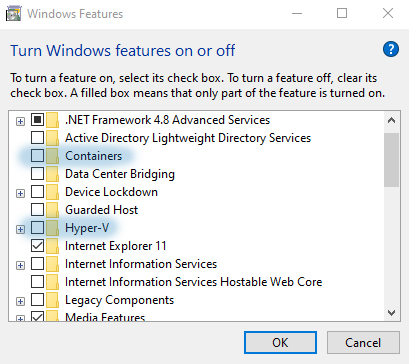
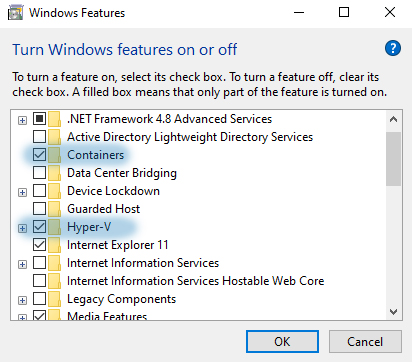
First of all, I installed the docker on my computer and then I marked the containers and Hyper-V features. so i got an error then I deleted docker completely and did the virtualization. so the error was fixed.

So what will we do, here is the simple solution

Open "Turn windows features on or off" from Control Panel

Remove the selections from containers and Hyper-V

onurtaskiran

Restart the computer

Mark the containers and Hyper-V features as selected

onurtaskiran

Restart your computer again

Install and run docker.

Angular User Registration and Login Example

Angular User Registration and Login Example

06 May 20229 min readWeb Programming

What are we gonna do, first of all, a home page will greet us with a welcome. We will have two buttons named register and login. When you click Register, our registration page will come up asynchronously. At the same time, when you click login, our login page will open in the same way. When logged in, the navbar will write a welcome user and there will be a logout button. Let 's do it

onurtaskiran onurtaskiran

Angular versions: Angular 11, 10, 9, 8, 7, 6, 2/5

User Model Path: /src/app/_models/user.ts

We define a small class that defines the properties of a user.

export interface User {
  username: string;
  token: string;
}

Account Service

Path: /src/app/_services/account.service.ts

Here we perform the methods for login, logout, and registration, and the standard methods for retrieving and modifying user data.

import { HttpClient } from '@angular/common/http';
import { Injectable } from '@angular/core';
import { ReplaySubject } from 'rxjs';
import {map} from 'rxjs/operators';
import { User } from '../_models/user';

@Injectable({
  providedIn: 'root'
})
export class AccountService {
  baseUrl = 'https://localhost:5001/api/';
  private currentUserSource = new ReplaySubject<User>(1);
  currentUser$ = this.currentUserSource.asObservable();

  constructor(private http: HttpClient) { }

  login(model: any) {
    return this.http.post(this.baseUrl + 'account/login', model).pipe(
      map((response: User) =>{
        const user = response;
        if (user) {
          localStorage.setItem('user',JSON.stringify(user));
          this.currentUserSource.next(user);
        }
      })
    )
  }

  register(model: any) {
    return this.http.post(this.baseUrl + 'account/register', model).pipe(
      map((user: User) => {
        if (user) {
          localStorage.setItem('user', JSON.stringify(user));
          this.currentUserSource.next(user);
        }
      })
    )
  }

  setCurrentUser(user:User) {
    this.currentUserSource.next(user);
  }

  logout() {
    localStorage.removeItem('user');
    this.currentUserSource.next(null);
  }
}

Home Component Template

Path: /src/app/home/home.component.html

what will we do here, first of all We welcome the client with a welcome message and send them to the login or registration form.

We transfer this process to the registration form with the *ngIf="registerMode" code or send it to the login form with the *ngIf="loginMode" code.

<div class="container mt-5">
  <div *ngIf="!registerMode && !loginMode" style='text-align: center;'>
    <h1>Welcome to My WebSite</h1>
     <p class="">All you need to do is sign up! or log in</p>

     <div class="text-center">
      <button (click)="registerToggle()" class="btn btn-primary btn-lg mr-2">Register</button>
      <button (click)="loginToggle()" class="btn btn-info btn-lg">Login</button>
     </div>
  </div>

    <div *ngIf="registerMode" class="container">
      <div class="row justify-content-center">
        <div class="col-4">
          <app-register (cancelRegister)="cancelRegisterMode($event)"></app-register>
        </div>
      </div>
    </div>

    <div *ngIf="loginMode" class="container">
      <div class="row justify-content-center">
        <div class="col-4">
          <app-login (cancelLogin)="cancelLoginMode($event)"></app-login>
        </div>
      </div>
    </div>

</div>

Home Component

Path: /src/app/home/home.component.ts

Here we are just creating a method called register toggle. The only purpose of this function is to take our registered and set it to the opposite of lists

import { HttpClient } from '@angular/common/http';
import { Component, OnInit } from '@angular/core';

@Component({
  selector: 'app-home',
  templateUrl: './home.component.html',
  styleUrls: ['./home.component.css']
})
export class HomeComponent implements OnInit {
  registerMode = false;
  loginMode = false;


  constructor() { }

  ngOnInit(): void {
  }

  registerToggle() {
    this.registerMode = !this.registerMode;

  }

  loginToggle() {
    this.loginMode = !this.loginMode;

  }

  cancelRegisterMode(event: boolean) {
    this.registerMode = event;
  }

  cancelLoginMode(event: boolean) {
    this.loginMode = event;
  }

}

Login Component Template

Path: /src/app/login/login.component.html

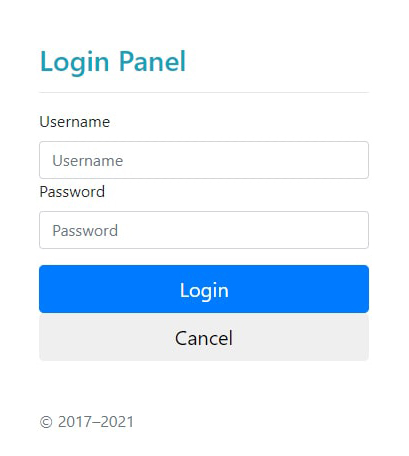
We send the username and password fields to the control angular infrastructure and the login process takes place securely.

<main class="form-signin">
  <form *ngIf="(accountService.currentUser$ | async) === null" #loginForm="ngForm" class="" (ngSubmit)="login()" autocomplete="off">
    <h1 class="h3 mb-3 fw-normal text-info">Login Panel</h1>
    <hr>
    <label for="inputEmail" class="visually-hidden">Username</label>
    <input
        name="username"
        [(ngModel)]="model.username"
        class="form-control"
        type="text"
        placeholder="Username">
    <label for="inputPassword" class="visually-hidden">Password</label>
    <input
        name="password"
        [(ngModel)]="model.password"
        class="form-control"
        type="password"
        placeholder="Password">
    <div class="checkbox mb-3">
    </div>
    <button class="w-100 btn btn-lg btn-primary" type="submit">Login</button>
    <button class="w-100 btn btn-lg btn-default" (click)="cancel()" type="button">Cancel</button>
    <p class="mt-5 mb-3 text-muted">&copy; 2017–2021</p>
  </form>
</main>

Login Component

Path: /src/app/login/login.component.ts

We use the account service to sign in

import { Component, OnInit, Output, EventEmitter } from '@angular/core';
import { AccountService } from '../_services/account.service';

@Component({
  selector: 'app-login',
  templateUrl: './login.component.html',
  styleUrls: ['./login.component.css']
})
export class LoginComponent implements OnInit {
  @Output() cancelLogin = new EventEmitter()
  model: any = {}

  constructor(public accountService: AccountService) { }

  ngOnInit(): void {
  }

  login() {
    this.accountService.login(this.model).subscribe(response => {
      console.log(response);
    }, error =>{
      console.log(error);
    })
  }

  logout() {
    this.accountService.logout();
  }

  cancel() {
    this.cancelLogin.emit(false);
  }

}

Nav Component Template

Path: /src/app/nav/nav.component.html

We make a design that can log out with the navbar after the user logs in.

<nav class="navbar navbar-expand-md navbar-dark fixed-top bg-dark">
  <div class="container">
    <a class="navbar-brand" href="#">Login App</a>

      <ul class="navbar-nav me-auto mb-2 mb-md-0" *ngIf="accountService.currentUser$ | async">
        <li class="nav-item">
          <a class="nav-link" aria-current="page" href="#">Profile</a>
        </li>
        <li class="nav-item">
          <a class="nav-link" href="#">Settings</a>
        </li>
        <li class="nav-item">
          <a class="nav-link" href="#">Messages</a>
        </li>
      </ul>

      <div class="dropdown" *ngIf="accountService.currentUser$ | async" dropdown>
        <a class="dropdown-toggle text-light" dropdownToggle>welcome user</a>
        <div class="dropdown-menu mt-3" *dropdownMenu>
          <a class="dropdown-item">Edit Profile</a>
          <div class="dropdown-divider"></div>
          <a class="dropdown-item" (click)="logout()">Logout</a>
        </div>
      </div>
  </div>
</nav>

Nav Component

Path: /src/app/nav/nav.component.ts

We are adding our logout service here.

import { Component, OnInit } from '@angular/core';
import { Observable } from 'rxjs';
import { User } from '../_models/user';
import { AccountService } from '../_services/account.service';

@Component({
  selector: 'app-nav',
  templateUrl: './nav.component.html',
  styleUrls: ['./nav.component.css']
})
export class NavComponent implements OnInit {
  model: any = {}

  constructor(public accountService: AccountService) { }

  ngOnInit(): void {
  }

    logout() {
    this.accountService.logout();
  }

}

Register Component Template

Path: /src/app/register/register.component.html

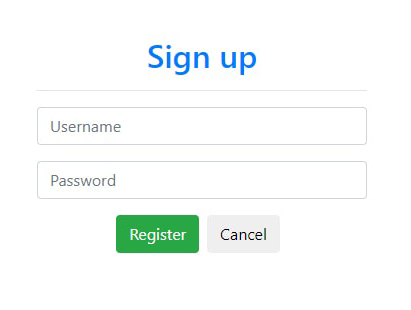
The registration component template includes a simple registration form with username and password fields. We send username with [(ngModel)]="model.username" code and [(ngModel)]="model.password" code and user password to the registration form.

<form #registerForm="ngForm" (ngSubmit)="register()" autocomplete="off">
  <h2 class="text-center text-primary">Sign up</h2>

  <hr>
  <div class="form-group">
    <input type="text" class="form-control" name="username"
        [(ngModel)]="model.username" placeholder="Username">
  </div>

  <div class="form-group">
    <input type="password" class="form-control" name="password"
        [(ngModel)]="model.password" placeholder="Password">
  </div>
  <div class="form-group text-center">
    <button class="btn btn-success mr-2" type="submit">Register</button>
    <button class="btn btn-default mr-2" (click)="cancel()" type="button">Cancel</button>
  </div>
</form>

Register Component

Path: /src/app/register/register.component.ts

Once the registration form is successful and successfully submitted, it creates a new user with the account service.

import { Component, Input, OnInit, Output,EventEmitter } from '@angular/core';
import { AccountService } from '../_services/account.service';


@Component({
  selector: 'app-register',
  templateUrl: './register.component.html',
  styleUrls: ['./register.component.css']
})
export class RegisterComponent implements OnInit {
  @Output() cancelRegister = new EventEmitter();
  model: any = {};

  constructor(private accountService: AccountService) { }

  ngOnInit(): void {
  }

  register() {
    this.accountService.register(this.model).subscribe(response =>{
      console.log(response);
      this.cancel();
    }, error => {
      console.log(error);
    })
  }

  cancel() {
    this.cancelRegister.emit(false);
  }

}

App Routing Module

Path: /src/app/app-routing.module.ts

The application routing module defines the top-level routes for angular application and creates a root routing module by forwarding the path sequence to the RouterModule.

import { NgModule } from '@angular/core';
import { RouterModule, Routes } from '@angular/router';

const routes: Routes = [];

@NgModule({
  imports: [RouterModule.forRoot(routes)],
  exports: [RouterModule]
})
export class AppRoutingModule { }

App Component Template

Path: /src/app/app.component.html

This component is the root component template for the application. It includes the main navigation bar, which is displayed only for authenticated users, and a general alert component, as well as a redirector output component to display the contents of each view according to the current path.

<app-nav></app-nav>

<div class="container" style="margin-top: 100px">
<app-home></app-home>
</div>

App Component

Path: /src/app/app.component.ts

app.component.ts is the root component of the application, the application can be set the root tag with the property of the @Component () decorator.

import { HttpClient } from '@angular/common/http';
import { Component, OnInit } from '@angular/core';
import { User } from './_models/user';
import { AccountService } from './_services/account.service';

@Component({
  selector: 'app-root',
  templateUrl: './app.component.html',
  styleUrls: ['./app.component.css']
})
export class AppComponent implements OnInit {
  title = 'The Dating App';
  users: any;

  constructor(private accountService: AccountService){}

  ngOnInit() {
    this.setCurrentUser();
  }

  setCurrentUser() {
    const user: User = JSON.parse(localStorage.getItem('user'));
    this.accountService.setCurrentUser(user);
  }

}

App Module

Path: /src/app/app.module.ts

This is the root module of our application.

import { NgModule } from "@angular/core";
import { BrowserModule } from "@angular/platform-browser";
import { HttpClientModule } from "@angular/common/http";

import { AppRoutingModule } from "./app-routing.module";
import { AppComponent } from "./app.component";
import { NavComponent } from "./nav/nav.component";
import { FormsModule } from "@angular/forms";
import { BsDropdownModule } from "ngx-bootstrap/dropdown";
import { BrowserAnimationsModule } from "@angular/platform-browser/animations";
import { HomeComponent } from "./home/home.component";
import { RegisterComponent } from "./register/register.component";
import { LoginComponent } from "./login/login.component";

@NgModule({
  declarations: [
    AppComponent,
    NavComponent,
    HomeComponent,
    RegisterComponent,
    LoginComponent,
  ],
  imports: [
    BrowserModule,
    AppRoutingModule,
    HttpClientModule,
    BrowserAnimationsModule,
    FormsModule,
    BsDropdownModule.forRoot(),
  ],
  providers: [],
  bootstrap: [AppComponent],
})
export class AppModule {}

Production Environment Config

Path: /src/environments/environment.prod.ts

export const environment = {
  production: true,
};

Development Environment Config

Path: /src/environments/environment.ts

export const environment = {
  production: false,
};

Main Index Html

Path: /src/index.html

The main index.html file is this file. It is the first page that started everything. Angular CLI gathers all compiled javascript files and injects them there

<!doctype html>
<html lang="en">
<head>
  <meta charset="utf-8">
  <title>DatingApp</title>
  <base href="/">
  <meta name="viewport" content="width=device-width, initial-scale=1">
  <link rel="icon" type="image/x-icon" href="favicon.ico">
</head>
<body>
  <app-root></app-root>
</body>
</html>

Main File

Path: /src/main.ts

It is the entry point where the application is launched and preloaded by angular.

import { enableProdMode } from "@angular/core";
import { platformBrowserDynamic } from "@angular/platform-browser-dynamic";

import { AppModule } from "./app/app.module";
import { environment } from "./environments/environment";

if (environment.production) {
  enableProdMode();
}

platformBrowserDynamic()
  .bootstrapModule(AppModule)
  .catch((err) => console.error(err));

Polyfills

Path: /src/polyfills.ts

This file is created automatically by the Angular CLI when creating a new project with the ng new command, and also allows the App to run on all major browsers.

import "zone.js/dist/zone";

Npm package.json

Path: /package.json

Package.json file, package dependencies installed with npm and npm start or npm run build etc. contains information about scripts.

{
  "name": "client",
  "version": "0.0.0",
  "scripts": {
    "ng": "ng",
    "start": "ng serve",
    "build": "ng build",
    "test": "ng test",
    "lint": "ng lint",
    "e2e": "ng e2e"
  },
  "private": true,
  "dependencies": {
    "@angular/animations": "~11.2.0",
    "@angular/common": "~11.2.0",
    "@angular/compiler": "~11.2.0",
    "@angular/core": "~11.2.0",
    "@angular/forms": "~11.2.0",
    "@angular/platform-browser": "~11.2.0",
    "@angular/platform-browser-dynamic": "~11.2.0",
    "@angular/router": "~11.2.0",
    "@schematics/angular": "^9.1.0",
    "bootstrap": "4.1.1",
    "font-awesome": "^4.7.0",
    "ngx-bootstrap": "^6.2.0",
    "rxjs": "~6.6.0",
    "tslib": "^2.0.0",
    "zone.js": "~0.11.3"
  },
  "devDependencies": {
    "@angular-devkit/build-angular": "~0.1102.0",
    "@angular/cli": "~11.2.0",
    "@angular/compiler-cli": "~11.2.0",
    "@types/jasmine": "~3.6.0",
    "@types/node": "^12.11.1",
    "codelyzer": "^6.0.0",
    "jasmine-core": "~3.6.0",
    "jasmine-spec-reporter": "~5.0.0",
    "karma": "~6.1.0",
    "karma-chrome-launcher": "~3.1.0",
    "karma-coverage": "~2.0.3",
    "karma-jasmine": "~4.0.0",
    "karma-jasmine-html-reporter": "^1.5.0",
    "protractor": "~7.0.0",
    "ts-node": "~8.3.0",
    "tslint": "~6.1.0",
    "typescript": "~4.1.2"
  }
}

TypeScript tsconfig.json

Path: /tsconfig.json

It tells you how to pass TypeScript code into JavaScript understood by the browser.

{
  "compileOnSave": false,
  "compilerOptions": {
    "baseUrl": "./",
    "outDir": "./dist/out-tsc",
    "forceConsistentCasingInFileNames": true,
    "strict": false,
    "noImplicitReturns": true,
    "noFallthroughCasesInSwitch": true,
    "sourceMap": true,
    "declaration": false,
    "downlevelIteration": true,
    "experimentalDecorators": true,
    "moduleResolution": "node",
    "importHelpers": true,
    "target": "es2015",
    "module": "es2020",
    "lib": [
      "es2018",
      "dom"
    ]
  },
  "angularCompilerOptions": {
    "enableI18nLegacyMessageIdFormat": false,
    "strictInjectionParameters": false,
    "strictInputAccessModifiers": false,
    "strictTemplates": false
  }
}
Making Php Cache

Making Php Cache

20 April 20222 min readWeb Programming

Websites made without cache can cause speed problems. An event called cache is the caching process. This is very suitable for speeding up your php pages. We can make our php pages that need to be faster with easy and efficient codes

I only serve two php pages. The first is t-cache.php and the other is b-cache.php you can give different names.

url = $_SERVER["SCRIPT_NAME"];
$break = Explode('/', $url);
$file = $break[count($break) - 1];
$cachefile = 'cached-'.substr_replace($file ,"",-4).'.html';
$cachetime = 18000;


if (file_exists($cachefile) && time() - $cachetime < filemtime($cachefile)) {
    echo "<!-- Cached copy, generated ".date('H:i', filemtime($cachefile))." -->\n";
    include($cachefile);
    exit;
}
ob_start(); // Start the output buffer

Paste the code above into our t-cache.php page.

As you can see, our code is simple, the first five lines create the html file in the name of our php file. For example, if I am using tonur.php file, it creates an html page named cached-tonur.html.

Do we have files in our later codes? Is not there? It does not run any php code if any. if not, it creates our cache file.

Let's add the codes to our b-cache.php page.

// import content to a file
$cached = fopen($cachefile, "w");
fwrite($cached, ob_get_contents());
fclose($cached);
ob_end_flush(); //send to browser

If our file is not found here, this code is executed. All of the php page is sent to the browser instead of working.

Yes now we are calling to our main php file with include as below.

include("top-cache.php");

// Your website codes

include("bottom-cache.php");

Your site is now faster.

Banshee

Banshee

16 April 20221 min readCinema

It is one of the best TV series I've seen. The plot of the TV series is very well edited. I think its value is not understood. But it doesn't matter. This doesn't change the fact that the Tv series is good. The character in the series is a man like Arsen Lupen. This Tv series shows what a man who hit rock bottom can do. There is a lot of action in every episode and has a great story, very good at acting.

Watching only the first episode is enough to understand the quality of the series.

The soundtrack of the series is also good. It is their music that makes such things beautiful.

here is one of them

onurtaskiran

About the TV Series:

An ex-con assumes the identity of a murdered sheriff in the small town of Banshee, Pennsylvania, where he has some unfinished business.

Creators: David Schickler, Jonathan Tropper

Stars: Antony Starr, Ivana Milicevic, Ulrich Thomsen

Upload Images to Related Tables in php

Upload Images to Related Tables in php

16 March 20222 min readWeb Programming

Set file paths to yourself. I named my page with html codes meta.php, I named my page with php codes as metas.php Database connection is made with connection.php in the include folder meta.php is located inside the admin folder. Pictures are taken to the upload folder. Upload folder is outside the admin folder When I say $new_name="../upload/" I say go out from the admin folder, go to the upload folder, upload the image...

Tables

meta -
  id -
  model_name -
  model_code -
  stock_status -
  new_product -
  showcase -
  status;

product_images

-id - meta_id - image_url - row - status;

I save the id of the meta table to the meta_id of the product_images table

Html File

<div class="content">
  <form
    action="../include/ametas.php"
    enctype="multipart/form-data"
    method="post">
    <div class="row">
      <label>Product Name</label>

      <div class="right">
        <input type="text" name="model_name" value="" />
      </div>
    </div>

    <div class="row">
      <label>Stock Code</label>

      <div class="right">
        <input type="text" name="model_code" value="" />
      </div>
    </div>

    <div class="row">
      <label>New Product</label>
      <div class="right">
        <input
          type="checkbox"
          name="new_product"
          value="1"
          id="third-check"
          class="require-one"
        />
        <label for="third-check">Mark as New Product</label>
      </div>
    </div>
    <div class="row">
      <label>HomePage</label>
      <div class="right">
        <input
          type="radio"
          name="showcase"
          value="1"
          id="radio-1"
          checked="checked"
        />
        <label for="radio-1">Show on homepage</label>

        <input type="radio" name="showcase" value="0" id="radio-2" />
        <label for="radio-2">Don't show on homepage</label>
      </div>
    </div>

    <div class="row">
      <label>Active Status</label>
      <div class="right">
        <input
          type="radio"
          name="status"
          value="1"
          id="radio-3"
          checked="checked"
        />
        <label for="radio-3">Product Active</label>

        <input type="radio" name="status" value="0" id="radio-4" />
        <label for="radio-4">Product Passive</label>
      </div>
    </div>
    <div class="row">
      <link rel="stylesheet" href="f.css" />
      <label>Resim</label>
      <div class="right">
        <input type="file" id="files" name="image_url" multiple />
        <button type="submit" class="green">
          <span>Select</span>
        </button>
      </div>
      <div class="">
        <output id="list"></output>
      </div>
      <script type="text/javascript" src="../js/fa.js"></script>
    </div>

    <button type="submit" class="green">
      <span>Save</span>
    </button>
  </form>
</div>

php page

<?php
include("connection.php");

if($_POST){

    if ($_FILES["image_url"]["size"]<1024*1024){
        if ($_FILES["image_url"]["type"]=="image/jpeg"){

            $model_name = $_POST["model_name"];
            $model_code = $_POST["model_code"];
            $new_product = $_POST["new_product"];
            $showcase = $_POST["showcase"];
            $status = $_POST["status"];

            $file_name=$_FILES["image_url"]["name"];
            $produce=array("as","rt","ty","yu","fg");
            $extension=substr($file_name,-4,4);
            $keep_number=rand(1,10000);
            $new_name="../upload/".$produce[rand(0,4)].$keep_number.$extension;

            if (move_uploaded_file($_FILES["image_url"]["tmp_name"],$new_name)){
                echo '<!--<script type="text/javascript">alert("Successfully uploaded"), window.location="../admin/meta.php";</script>-->';
                $metas=mysql_query("insert into meta SET model_name='$model_name',model_code = '$model_code',new_product='$new_product',showcase='$showcase',status='$status'");
                $gid = mysql_insert_id();
                $sorgu=mysql_query("insert into product_images SET meta_id='$gid',image_url='$new_name'");
                if ($metas && $sorgu){
                    echo '<!--<script type="text/javascript">alert("Registration Successful"), window.location="../admin/meta.php";</script>-->';
                }else{
                    echo '<!--<script type="text/javascript">alert("There was a problem during registration"), window.location="../admin/meta.php";</script>-->';
                }
            }else{
                echo '<!--<script type="text/javascript">alert("File failed to upload"), window.location="../admin/meta.php";</script>-->';
            }
        }else{
            echo '<!--<script type="text/javascript">alert("The file can only be in jpeg format"), window.location="../admin/meta.php";</script>-->';
        }
    }else{
        echo '<!--<script type="text/javascript">alert("File cannot exceed 1mb"), window.location="../admin/meta.php";</script>-->';
    }
}
?>

Thanks.

How to Create a Slider in JavaScript

How to Create a Slider in JavaScript

16 March 20223 min readWeb Programming

Slider is the showcase of a website. So it is necessary to understand the logic well. There are many sliders we use on websites. We can use jquery, but we need to understand its logic with javascript.

I have been developing projects with javascript recently. Here is a slider application I have coded. The pictures change at the specified interval of seconds or change them with the arrow keys, also each slider has its own name and website.

First, let's code it to be changed only with the arrow keys

var models = [
  {
    name: "Apple",
    image: "img/apple.jpg",
    link: "https://www.apple.com/",
  },
  {
    name: "Ibm",
    image: "img/ibm .jpg",
    link: "https://www.ibm.com",
  },
  {
    name: "Microsoft",
    image: "img/microsoft .jpg",
    link: "https://www.microsoft.com",
  },
  {
    name: "Philips",
    image: "img/philips.jpg",
    link: "https://www.philips.com",
  },
  {
    name: "Samsung",
    image: "img/samsung.jpg",
    link: "https://www.samsung.com",
  },
];

var index = 0;
var slaytCount = models.length;
var settings = {
  duration: "3000",
  random: true,
};

ShowSlide(index);

document
  .querySelector(".fa-arrow-circle-left")
  .addEventListener("click", function () {
    index--;
    ShowSlide(index);
    console.log(index);
  });

document
  .querySelector(".fa-arrow-circle-right")
  .addEventListener("click", function () {
    index++;
    ShowSlide(index);
    console.log(index);
  });

function init(settings) {
  setInterval(
    function () {
      if (settings.random) {
        index = Math.floor(Math.random() * slaytCount);
      } else {
      }
    },
    settings,
    duration,
  );
}

function ShowSlide(i) {
  index = i;

  if (i < 0) {
    index = slaytCount - 1;
  }
  if (i >= slaytCount) {
    index = 0;
  }

  document
    .querySelector(".fa-arrow-circle-right")
    .addEventListener("click", function () {});

  document.querySelector(".card-title").textContent = models[index].name;

  document
    .querySelector(".card-img-top")
    .setAttribute("src", models[index].image);

  document.querySelector(".card-link").setAttribute("href", models[index].link);
}


Now, let's send it forward at the interval of seconds we set.

var models = [
  {
    name: "Apple",
    image: "img/apple.jpg",
    link: "https://www.apple.com/",
  },
  {
    name: "Ibm",
    image: "img/ibm .jpg",
    link: "https://www.ibm.com",
  },
  {
    name: "Microsoft",
    image: "img/microsoft .jpg",
    link: "https://www.microsoft.com",
  },
  {
    name: "Philips",
    image: "img/philips.jpg",
    link: "https://www.philips.com",
  },
  {
    name: "Samsung",
    image: "img/samsung.jpg",
    link: "https://www.samsung.com",
  },
];

var index = 0;
var slaytCount = models.length;
var interval;

var settings = {
  duration: "3000",
  random: false,
};

init(settings);

document
  .querySelector(".fa-arrow-circle-left")
  .addEventListener("click", function () {
    index--;
    ShowSlide(index);
    console.log(index);
  });

document
  .querySelector(".fa-arrow-circle-right")
  .addEventListener("click", function () {
    index++;
    ShowSlide(index);
    console.log(index);
  });

document.querySelectorAll(".arrow").forEach(function (item) {
  item.addEventListener("mouseenter", function () {
    clearInterval(interval);
  });
});

document.querySelectorAll(".arrow").forEach(function (item) {
  item.addEventListener("mouseleave", function () {
    init(settings);
  });
});

function init(settings) {
  var prev;
  interval = setInterval(function () {
    if (settings.random) {
      do {
        index = Math.floor(Math.random() * slaytCount);
      } while (index == prev);
      prev = index;
    } else {
      if (slaytCount == index + 1) {
        index = -1;
      }
      ShowSlide(index);
      console.log(index);
      index++;
    }

    ShowSlide(index);
  }, settings.duration);
}

function ShowSlide(i) {
  index = i;

  if (i < 0) {
    index = slaytCount - 1;
  }
  if (i >= slaytCount) {
    index = 0;
  }

  document
    .querySelector(".fa-arrow-circle-right")
    .addEventListener("click", function () {});

  document.querySelector(".card-title").textContent = models[index].name;

  document
    .querySelector(".card-img-top")
    .setAttribute("src", models[index].image);

  document.querySelector(".card-link").setAttribute("href", models[index].link);
}

Our html codes

<!doctype html>
<html lang="en">
  <head>
    <!-- Required meta tags -->
    <meta charset="utf-8">
    <meta name="viewport" content="width=device-width, initial-scale=1, shrink-to-fit=no">

    <!-- Bootstrap CSS -->
    <link rel="stylesheet" href="https://stackpath.bootstrapcdn.com/bootstrap/4.1.3/css/bootstrap.min.css">
    <link rel="stylesheet" href="https://use.fontawesome.com/releases/v5.2.0/css/all.css">

    <title>Hello, world!</title>
  </head>
  <body>
    <div class="container mt-2">
        <div class="row">
            <div class="col-md-6">

                <div class="card">
                    <img class="card-img-top" src="img/apple.jpg" alt="">
                    <div class="card-body">
                        <h5 class="card-title">Apple</h5>
                        <p class="card-text"></p>
                        <a class="card-link" href="#">Read More</a>
                     </div>
                     <div class="card-footer">
                            <i class="fas fa-arrow-circle-left fa-2x arrow"></i>
                            <i class="fas fa-arrow-circle-right fa-2x arrow"></i>
                     </div>
                </div>
            </div>
        </div>
    </div>

    <script src="https://code.jquery.com/jquery-3.3.1.slim.min.js"></script>
    <script src="https://cdnjs.cloudflare.com/ajax/libs/popper.js/1.14.3/umd/popper.min.js"></script>
    <script src="https://stackpath.bootstrapcdn.com/bootstrap/4.1.3/js/bootstrap.min.js"></script>

  <script src="script.js"></script>
  </body>
</html>
How to Create Pagination With Php and Mysql

How to Create Pagination With Php and Mysql

16 February 20223 min readWeb Programming

Pagination breaks down large lists. So the page view is good and loads faster. Pagination is used in almost all web projects. Here is a simple example for you. We will make our application using Php, Mysql, Jquery and Bootstrap technologies.

First, we need to create database and tables.

CREATE TABLE IF NOT EXISTS `employee` (
  `id` int(11) NOT NULL PRIMARY KEY AUTO_INCREMENT,
  `employee_name` varchar(70) NOT NULL,
  `employee_salary` varchar(50) NOT NULL
) ENGINE=InnoDB DEFAULT CHARSET=latin1;

INSERT INTO `employee` (`id`, `employee_name`, `employee_salary`) VALUES
(1, 'Jon Jones', '90000'),
(2, 'Khabib Nurmagomedov', '78000'),
(3, 'Stipe Miocic ', '65000'),
(4, 'Dustin Poirier', '85000'),
(5, 'Justin Gaethje', '30000'),
(6, 'Max Holloway', '28000'),
(7, 'Petr Yan ', '16000'),
(8, 'Conor McGregor ', '52000'),
(9, 'Tony Ferguson', '78000'),
(10, 'Robert Whittaker ', '42000'),
(11, 'Nate Diaz', '48000'),
(12, 'Jorge Masvidal', '84000');

I used the names of the ufc fighters in the example. It is the sport I follow with love. 😄

Let's use the following code to create a MySQL database connection

connect.php

<?php
/* Database connection start */
$servername = "localhost";
$username = "root";
$password = "";
$dbname = "pagination";
$conn = mysqli_connect($servername, $username, $password, $dbname) or die("Connection failed: " . mysqli_connect_error());
if (mysqli_connect_errno()) {
    printf("Connect failed: %s\n", mysqli_connect_error());
    exit();
}
?>

container.php dosyası

</head>
<body class="">
<div role="navigation" class="navbar navbar-default navbar-static-top">
      <div class="container">
        <div class="navbar-header">
          <button data-target=".navbar-collapse" data-toggle="collapse" class="navbar-toggle" type="button">
            <span class="sr-only"></span>
            <span class="icon-bar"></span>
            <span class="icon-bar"></span>
            <span class="icon-bar"></span>
          </button>
          <a href="#" class="navbar-brand">PAGINATION</a>
        </div>
        <div class="navbar-collapse collapse">
          <ul class="nav navbar-nav">
            <li class="active"><a href="#">LİST</a></li>

          </ul>

        </div><!--/.nav-collapse -->
      </div>
    </div>

<div class="container" style="min-height:500px;">
<div class=''>
</div>

Including the bootstrap and jquery libraries with our header.php file

header.php

<html>
<head>
<meta http-equiv="Content-Type" content="text/html; charset=utf-8" />
<link rel="stylesheet" href="bootstrap.min.css">
<link rel="stylesheet" href="bootstrap-theme.min.css">
<script src="jquery.min.js"></script>
<script src="bootstrap.min.js"></script>

And finally our index page

index.php

<?php
include('header.php');
?>
<title>Simple Pagination with PHP and MySQL</title>
<?php include('container.php');?>
<div class="container">
	<h2>Simple Pagination with PHP and MySQL onurtaskiran.com</h2>
	<?php
	include_once("connect.php");
	$showRecordPerPage = 5;
	if(isset($_GET['page']) && !empty($_GET['page'])){
		$currentPage = $_GET['page'];
	}else{
		$currentPage = 1;
	}
	$startFrom = ($currentPage * $showRecordPerPage) - $showRecordPerPage;
	$totalEmpSQL = "SELECT * FROM employee";
	$allEmpResult = mysqli_query($conn, $totalEmpSQL);
	$totalEmployee = mysqli_num_rows($allEmpResult);
	$lastPage = ceil($totalEmployee/$showRecordPerPage);
	$firstPage = 1;
	$nextPage = $currentPage + 1;
	$previousPage = $currentPage - 1;
	$empSQL = "SELECT id,employee_name, employee_salary
	FROM `employee` LIMIT $startFrom, $showRecordPerPage";
	$empResult = mysqli_query($conn, $empSQL);
	?>
	<table class="table ">
	<thead>
		<tr>
			<th>EmpID</th>
			<th>Name</th>
			<th>Salary</th>
		</tr>
	</thead>
	<tbody>
		<?php
		while($emp = mysqli_fetch_assoc($empResult)){
		?>
			<tr>
				<th scope="row"><?php echo $emp['id']; ?></th>
				<td><?php echo $emp['employee_name']; ?></td>
				<td><?php echo $emp['employee_salary']; ?></td>
			</tr>
		<?php } ?>
	</tbody>
	</table>
	<nav aria-label="Page navigation">
	  <ul class="pagination">
	  <?php if($currentPage != $firstPage) { ?>
		<li class="page-item">
		  <a class="page-link" href="?page=<?php echo $firstPage ?>" tabindex="-1" aria-label="Previous">
			<span aria-hidden="true">First</span>
		  </a>
		</li>
		<?php } ?>
		<?php if($currentPage >= 2) { ?>
			<li class="page-item"><a class="page-link" href="?page=<?php echo $previousPage ?>"><?php echo $previousPage ?></a></li>
		<?php } ?>
		<li class="page-item active"><a class="page-link" href="?page=<?php echo $currentPage ?>"><?php echo $currentPage ?></a></li>
		<?php if($currentPage != $lastPage) { ?>
			<li class="page-item"><a class="page-link" href="?page=<?php echo $nextPage ?>"><?php echo $nextPage ?></a></li>
			<li class="page-item">
			  <a class="page-link" href="?page=<?php echo $lastPage ?>" aria-label="Next">
				<span aria-hidden="true">Last</span>
			  </a>
			</li>
		<?php } ?>
	  </ul>
	</nav>

</div>
</div>
</body>
</html>

Result Page 1

onurtaskiran

Page onurtaskiran

That is all. good codings. Good luck.