Reading and Writing JSON Files with Javascript

Reading and Writing JSON Files with Javascript

10 February 20222 min readWeb Programming

I will code a simple application that converts string JSON file to object with javascript and displays it in html format. Json file is used for transmitting data between a web application and a server. JSON is widely used in Ajax Web application programming. It has become increasingly popular as an alternative to XML.

First, let's create our JSON file. I'm making the name of my file posts.json and I am entering four pieces of data

[
  {
    postTitle: "Javascript",
    category: "Software",
    reads: 120,
    status: true,
  },
  {
    postTitle: "Asp.Net",
    category: "Software",
    reads: 190,
    status: false,
  },
  {
    postTitle: "The Wild One",
    category: "Movie",
    reads: 190,
    status: true,
  },
  {
    postTitle: "MMA",
    category: "Sport",
    reads: 244,
    status: false,
  },
];

Now let's create our script.js file. We will access our json file with this code.

rawFile.open("GET", "posts.json", true);

We convert our Json file from string to object with the following code.

let posts = JSON.parse(this.responseText);
rawFile.open("GET", "posts.json", true);

We print to html with forEach loop

And with this code we show it in div

document.querySelector("# posts").innerHTML = html;

script.js

document.querySelector("#getPost").addEventListener("click", loadPost);

function loadPost() {
  const rawFile = new XMLHttpRequest();
  rawFile.open("GET", "posts.json", true);

  rawFile.onload = function () {
    if (this.status === 200) {
      let posts = JSON.parse(this.responseText);

      let html = "";
      posts.forEach((post) => {
        html += `              
                            <div class="col-3">
                            ${post.postTitle}
                            </div>
                            <div class="col-3">
                            ${post.category}
                            </div>
                            <div class="col-3">
                            ${post.reads}
                            </div>
                            <div class="col-3">
                            ${post.status}
                            </div>
                         `;
      });
      document.querySelector("#posts").innerHTML = html;
    }
  };
  rawFile.send();
}

Let's create our html code using bootstrap.

<!doctype html>
<html lang="en">

<head>
	<!-- Required meta tags -->
	<meta charset="utf-8">
	<meta name="viewport" content="width=device-width, initial-scale=1, shrink-to-fit=no">

	<!-- Bootstrap CSS -->
	<link rel="stylesheet" href="https://stackpath.bootstrapcdn.com/bootstrap/4.1.3/css/bootstrap.min.css">
	<link rel="stylesheet" href="https://use.fontawesome.com/releases/v5.2.0/css/all.css">
	<link rel="stylesheet" href="style.css">
	<title></title>
</head>

<body>

	<div class="container mt-2 bg-dark text-white">

		<div class="row border border-white">
			<div class="col-3">
				Post Title
			</div>
			<div class="col-3">
				Category
			</div>
			<div class="col-3">
				Reads
			</div>
			<div class="col-3">
				Status
			</div>
		</div>
		<div id="posts" class="row">

		</div>
	<button id="getPost" class="btn btn-secondary btn-lg" >Get Posts</button>
	</div>
	<script src="https://code.jquery.com/jquery-3.3.1.slim.min.js"></script>
	<script src="https://stackpath.bootstrapcdn.com/bootstrap/4.1.3/js/bootstrap.min.js"></script>
	<script src="script.js"></script>
</body>

</html>

The result is as in the image

onurtaskiran

That is all. Bye 😊

C Sharp Entity Framework Data Insert Deletion Update Operations

C Sharp Entity Framework Data Insert Deletion Update Operations

30 January 20223 min readSoftware

Entity Framework is an object-relational mapper (O/RM) that enables .NET developers to work with a database using .NET objects. It eliminates the need for most of the data-access code that developers usually need to write.” Entity Framework is an open-source ORM framework for .NET applications supported by Microsoft. Architects and developers of data-oriented applications have typically struggled with the need to achieve two very different objectives.

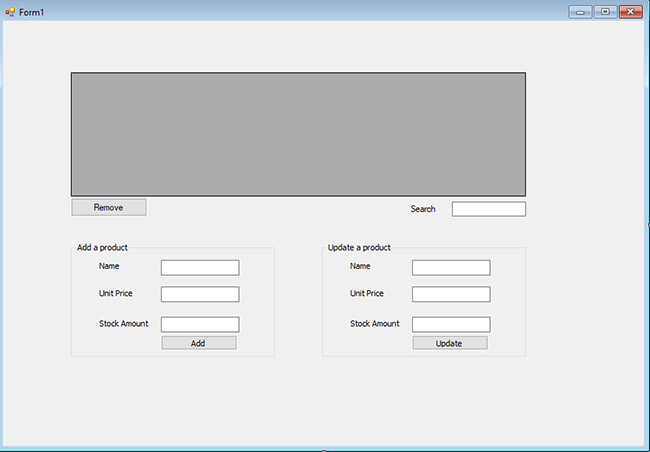
Create one Window form application

Create the form as below.

onurtaskiran

Let's create our product object

Product.cs

namespace EntityFrameworkExample
{
    public class Product
    {
        public int Id { get; set; }
        public string Name { get; set; }
        public decimal UnitPrice { get; set; }
        public int StockAmount { get; set; }
    }
}

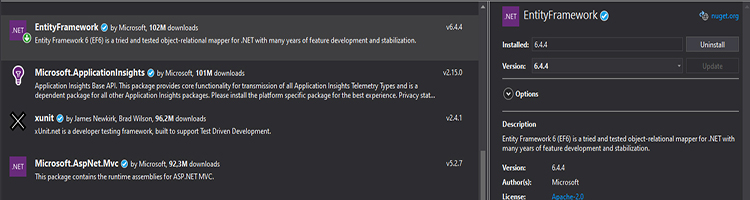
Now, in this step, we will install entity framework. So, go to nuget package manager and then install theentity framework as you do see below in the screenshot.

onurtaskiran

Create the CompanyContext class as follows

CompanyContext.cs

using System.Data.Entity;

namespace EntityFrameworkExample
{
    public class CompanyContext : DbContext
    {
        public DbSet<Product> Products { get; set; }
    }
}

Form1.cs

using System;
using System.Windows.Forms;

namespace EntityFrameworkExample
{
    public partial class Form1 : Form
    {
        public Form1()
        {
            InitializeComponent();
        }

        private void dgwProducts_CellContentClick(object sender, DataGridViewCellEventArgs e)
        {

        }

        ProductCon _productCon=new ProductCon();
        private void Form1_Load(object sender, EventArgs e)
        {
            LoadProducts();
        }

        private void LoadProducts()
        {
            dgwProducts.DataSource = _productCon.GetAll();
        }

        private void SearchProducts(string key)
        {
           // var result = _productCon.GetAll().Where(p => p.Name.Contains(key)).ToList();
           var result = _productCon.GetByName(key);
            dgwProducts.DataSource = result;
        }

        private void btnAdd_Click(object sender, EventArgs e)
        {
            _productCon.Add(new Product
            {
                Name = tbxName.Text,
                UnitPrice = Convert.ToDecimal(tbxUnitPrice.Text),
                StockAmount = Convert.ToInt32(tbxStockAmount.Text)
            });
            LoadProducts();
            MessageBox.Show("Added!");
        }

        private void btnUpdate_Click(object sender, EventArgs e)
        {
            _productCon.Update(new Product
            {
                Id = Convert.ToInt32(dgwProducts.CurrentRow.Cells[0].Value),
                Name = tbxNameUpdate.Text,
                UnitPrice = Convert.ToDecimal(tbxUnitPriceUpdate.Text),
                StockAmount = Convert.ToInt32(tbxStockAmountUpdate.Text)
            });
            LoadProducts();
            MessageBox.Show("Updated");
        }


        private void btnAdd_Click_1(object sender, EventArgs e)
        {
            _productCon.Add(new Product
            {
                Name = tbxName.Text,
                UnitPrice = Convert.ToDecimal(tbxUnitPrice.Text),
                StockAmount = Convert.ToInt32(tbxStockAmount.Text)
            });
            LoadProducts();
            MessageBox.Show("Added!");
        }

        private void tbxSearch_TextChanged_1(object sender, EventArgs e)
        {
            SearchProducts(tbxSearch.Text);
        }

        private void btnRemove_Click_1(object sender, EventArgs e)
        {
            _productCon.Delete(new Product
            {
                Id = Convert.ToInt32(dgwProducts.CurrentRow.Cells[0].Value)
            });
            LoadProducts();
            MessageBox.Show("Deleted!");
        }

        private void dgwProducts_CellContentClick_1(object sender, DataGridViewCellEventArgs e)
        {
            tbxNameUpdate.Text = dgwProducts.CurrentRow.Cells[1].Value.ToString();
            tbxUnitPriceUpdate.Text = dgwProducts.CurrentRow.Cells[2].Value.ToString();
            tbxStockAmountUpdate.Text = dgwProducts.CurrentRow.Cells[3].Value.ToString();
        }


    }
}

ProductCon.cs

using System.Collections.Generic;
using System.Data.Entity;
using System.Linq;

namespace EntityFrameworkExample
{
    class ProductCon
    {
        public List<Product> GetAll()
        {
            using (CompanyContext context = new CompanyContext())
            {
                return context.Products.ToList();
            }
        }

        public List<Product> GetByName(string key)
        {
            using (CompanyContext context = new CompanyContext())
            {
                return context.Products.Where(p => p.Name.Contains(key)).ToList();
            }
        }

        public void Add(Product product)
        {
            using (CompanyContext context = new CompanyContext())
            {
                // context.Products.Add(product);
                var entity = context.Entry(product);
                entity.State = EntityState.Added;
                context.SaveChanges();
            }
        }

        public void Update(Product product)
        {
            using (CompanyContext context = new CompanyContext())
            {
                var entity = context.Entry(product);
                entity.State = EntityState.Modified;
                context.SaveChanges();
            }
        }

        public void Delete(Product product)
        {
            using (CompanyContext context = new CompanyContext())
            {
                var entity = context.Entry(product);
                entity.State = EntityState.Deleted;
                context.SaveChanges();
            }
        }
    }
}

App.config

<?xml version="1.0" encoding="utf-8"?>
<configuration>
  <configSections>
  <section name="entityFramework"
    type="System.Data.Entity.Internal.ConfigFile.EntityFrameworkSection, EntityFramework, Version=6.0.0.0, Culture=neutral, PublicKeyToken=b77a5c561934e089"
    requirePermission="false"/>
  </configSections>
  <connectionStrings>
    <add name="CompanyContext" connectionString="server=(localdb)\mssqllocaldb;initial catalog=Company;integrated security=true"
      providerName="System.Data.SqlClient"/>

  </connectionStrings>
  <startup>
    <supportedRuntime version="v4.0" sku=".NETFramework,Version=v4.7.2"/>
  </startup>
  <entityFramework>
    <providers>
      <provider invariantName="System.Data.SqlClient" type="System.Data.Entity.SqlServer.SqlProviderServices, EntityFramework.SqlServer"/>
    </providers>
  </entityFramework>
</configuration>
Making Simple Captcha with Symfony

Making Simple Captcha with Symfony

16 January 20222 min readWeb Programming

With captcha, we check whether the data is entered by users, and we prevent many attacks such as XSS attack or SQL injection. Captcha making with Symfony is simple, also very paritic and safe to use I'll explain step by step how it's done. The number encrypted with md5 will be 32 characters long. We will take 6 characters.

$captcha = strtoupper(substr($md5, 8, 6));

We save the code to be used for confirmation in the opened session

$session->set('captcha',$captcha);

Picture dimensions are determined

$width = 75;
$height = 25;

The picture that we will work on is being created.

$image = ImageCreate($en, $boy);

We create White, Black and Red colors. Numbers refer to colors.

$white = ImageColorAllocate($image, 255, 255, 255);
$black = ImageColorAllocate($image, 0, 0, 0);
$red = ImageColorAllocate($image, 242, 0, 0);

Here we make the background white

ImageFill($image, 0, 0, $white);

We write the generated verification code on the picture.

ImageString($image, 6, 9, 5, $session->get('captcha'), $black);

We complicate the image with lines to blend the landscape a little. If you wish, you can remove the lines by removing the imageline() lines.

imageline($image, 0, 2, $width, 2, $red);
imageline($image, 0, 25, $height, 0, $red);
imageline($image, $width, $height, 40, 0, $red);
imageline($image, 0, 23, $width, 23, $red);

We send the type of our file to the browser.

header("Content-Type: image/jpeg");

We print our picture in Jpg format.

ImageJpeg($image);

We are deleting it because we will use it only once.

ImageDestroy($image);
exit();

That is all. Below are all the codes. Happy codings...

 public function captchaAction( )
    {
        $em       = $this->getDoctrine()->getEntityManager();
        $request = $this->getRequest();
        $session = $request->getSession();

        $md5=md5(rand(0,9999));

        $captcha = strtoupper(substr($md5, 8, 6));

        $session->set('captcha',$captcha);

        $width = 75;
        $height = 25;

        $image = ImageCreate($width, $height);

        $white = ImageColorAllocate($image, 255, 255, 255);
        $black = ImageColorAllocate($image, 0, 0, 0);
        $red = ImageColorAllocate($image, 242, 0, 0);

        ImageFill($image, 0, 0, $white);

        ImageString($image, 6, 9, 5, $session->get('captcha'), $black);

        imageline($image, 0, 2, $width, 2, $red);
        imageline($image, 0, 25, $height, 0, $red);
        imageline($image, $width, $height, 40, 0, $red);
        imageline($image, 0, 23, $width, 23, $red);

        header("Content-Type: image/jpeg");

        ImageJpeg($image);

        ImageDestroy($image);
        exit();
    }
    ```
Good bye...
Symfony Database Operations

Symfony Database Operations

16 January 20221 min readWeb Programming

There are many methods of capturing data. I'll convey what I know. For example: we created a table called tal_news. When writing the table name in Symfony, we write the first letters uppercase, make the table name TalNews (Capital letters must come after the first letter and underscore)

The simplest way is to pull all the data from our tal_reseller table with findAll.

  $em       = $this->getDoctrine()->getEntityManager();
  $members = $em->getRepository('ModulesAdminBundle:TalReseller')->findAll();

Let's find the ones with status 1 in our activity table

$em = $this->getDoctrine()->getEntityManager();
$activity = $em->getRepository('ModulesAdminBundle:Activity')->findBy(array('status'=>1));

Let's do the same with the select statement in the tal_news table... In some cases we cannot use the above method. Select method solves this problem

$em = $this->getDoctrine()->getEntityManager();
$news = $em->createQuery("SELECT t FROM ModulesAdminBundle:TalNews t where t.status=1")->getResult();

If the TalReseller id and the ResellerImages id are the same here, we say perform the process

public function portfolyoAction($id,$fullname)
    {
        $em       = $this->getDoctrine()->getEntityManager();
        $id = intval($id);

        $portfol = $em->getRepository('ModulesAdminBundle:TalReseller')->findOneBy(array('id'=>$id));
        if($portfol){
            $ResellerImages = $em->getRepository('ModulesAdminBundle:ResellerImages')->findBy(array('resellerId'=>$id));
        }else{
            return $this->redirect('/');
        }


		 return $this->render('ModulesUiBundle:Profil:profil.html.twig',array(
            'portfol'           => $portfol,
            'ResellerImages'    => $ResellerImages,

        ));
    }
    ```