Mr Inbetween

Mr Inbetween

10 February 20242 min readCinema

This series is definitely a hidden gem. The story is amazing from beginning to end. So, while watching it, I felt the quality of Hollywood TV series. A show that is so good and so underrated. I can say that it is one of the rare good TV series I have watched. In summary, it is a good and entertaining series. The fact that the series' episodes are short makes it even better. The best aspect of the series is that the lead character behaves very realistically. In this case, while watching the series, it makes you feel as if you are watching a slice of real life.

onurtaskiran

A feature of the character played by Scott Ryan is that in fight or flight situations, the character can choose to fight. In other words, the character's direct aggression without having too much dialogue with people increases the viewing pleasure.

If you're having trouble finding something to watch lately, I suggest you give this series a try.

onurtaskiran

Storyline "Mr Inbetween" is a crime-drama television series created by Australian writer and actor Scott Ryan. The show focuses on the life of a hitman named Ray Shoesmith. Scott Ryan takes on the lead role and is also the creator, writer, and executive producer of the series.

The series premiered on FX channel in 2018. Comprising short episodes, "Mr Inbetween" delves into Ray Shoesmith's professional challenges, family relationships, and personal struggles.

Ray Shoesmith is a complex character with a compelling background in the criminal underworld. Despite being a skilled assassin, he is also a father and an ex-husband, attempting to navigate both aspects of his life. The show explores how Ray tries to balance these two worlds and grapples with ethical dilemmas. The character's complexity is highlighted by the juxtaposition of the harshness of the criminal world with themes of humanity and family.

Using Tailwind CSS in React

Using Tailwind CSS in React

07 February 20244 min readWeb Programming

Tailwind reduces the need to write custom CSS and increases the customizability of the project. With benefits like responsive design, dynamic and reusable classes, consistency, and broad community support, Tailwind is a popular choice in modern web development. Tailwind reduces the file size of the project and improves performance by removing unused style rules and generating only the styles that are needed. It allows developers to quickly adapt to the project. Tailwind offers comprehensive documentation and a large community. Users can quickly solve their problems and access information. You can always visit the docs and search for the feature in question.

Let's examine how we install and use Tailwind CSS in our React project.

I'm creating our React project.

npx create-react-app my-project
cd my-project

First of all, we need to add Tailwind to your project. You can install Tailwind with a command like this:

npm install -D tailwindcss

Configuration: Before using Tailwind, we create a configuration file. We can create a file called tailwind.config.js in the root directory of your project and make your customizations there.

Run this command to create the tailwind.config.js file:

npx tailwindcss init

An example tailwind.config.js file:

/** @type {import('tailwindcss').Config} */
module.exports = {
  content: ["./src/**/*.{js,jsx,ts,tsx}"],
  theme: {
    extend: {},
  },
  plugins: [],
};

Creating CSS: After adding Tailwind to your project, create a CSS file and add the Tailwind classes to it. You can create a sample file like this (for example, index.css):

/* index.css */
@tailwind base;
@tailwind components;
@tailwind utilities;

/* You can add custom styles here as needed */

Usage in HTML: You can apply styling by adding Tailwind classes to elements. For example:

function App() {
  return (
    <div className="container mx-auto mt-8 p-4">
      <div className="max-w-md mx-auto bg-stone-700 rounded-md overflow-hidden shadow-md">
        <img
          className="w-full h-48 object-cover"
          src="https://source.unsplash.com/800x600/?cat"
          alt="Kedi Resmi"
        />
        <div className="p-4">
          <h1 className="text-2xl font-bold mb-2 text-gray-50">Cute cat </h1>
          <p className="text-slate-300">
            Lorem ipsum dolor sit amet, consectetur adipiscing elit. Nulla quam
            velit, vulputate eu pharetra nec, mattis ac neque.
          </p>
          <div className="mt-4">
            <span className="text-sm text-gray-400">
              Category:
              <a href="#" className="text-amber-300">
                Animals
              </a>
            </span>
          </div>
        </div>
      </div>
    </div>
  );
}

export default App;
onurtaskiran

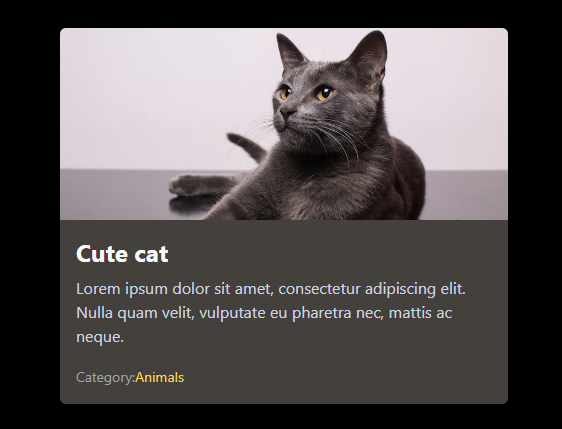
In this example, there is a picture card and a grid structure on the page.

container mx-auto mt-8 p-4: These classes centralize the content container, leave a space at the top, and add internal space around the content.

max-w-md mx-auto bg-stone-700 rounded-md overflow-hidden shadow-md: These classes set maximum width (md: medium), center content, set background color to stone-700, round corners, hide overflow and add a shadow.

w-full h-48 object-cover: These classes stretch the image width (w-full), set its height (h-48), and the object-cover class ensures the image covers the container while maintaining its aspect ratio.

text-2xl font-bold mb-2 text-gray-50: These classes style the title; they set the text size (text-2xl), choose a bold font (font-bold), add bottom margin (mb-2), and set the text color (text-gray-50).

text-slate-300: This class sets the text color.

mt-4: This class adds top margin (mt-4).

text-sm text-gray-400: These classes set a small text size (text-sm) and define the text color (text-gray-400).

text-amber-300: This class sets the text color (text-amber-300).

By following these simple steps, you can quickly apply styles to your project using Tailwind CSS. It's also beneficial to explore Tailwind CSS's comprehensive documentation: Tailwind CSS Documentation.

Custom Css

Let's see how we can create our own custom class. so we can avoid some repetitions.

max-w-md mx-auto bg-stone-700

I use these two classes to center the elements, and with the other we give color. I basically align them the same way. I want to do the same for future episodes.

@tailwind base;
@tailwind components;
@tailwind utilities;

@layer components {
  .align-item {
    @apply max-w-md mx-auto bg-stone-700;
  }
}

and we add it to our class.

<div class="align-item rounded-md overflow-hidden shadow-md">

So our first code will be as follows.

<div className="container mx-auto mt-8 p-4">
  <div className="align-item rounded-md overflow-hidden shadow-md">
    <img
      className="w-full h-48 object-cover"
      src="https://source.unsplash.com/800x600/?cat"
      alt="Kedi Resmi"
    />
    <div className="p-4">
      <h1 className="text-2xl font-bold mb-2 text-gray-50">Cute cat </h1>
      <p className="text-slate-300">
        Lorem ipsum dolor sit amet, consectetur adipiscing elit. Nulla quam
        velit, vulputate eu pharetra nec, mattis ac neque.
      </p>
      <div className="mt-4">
        <span className="text-sm text-gray-400">
          Category:
          <a href="#" className="text-amber-300">
            Animals
          </a>
        </span>
      </div>
    </div>
  </div>
</div>

And as a result, our code will perform the same operation.

Happy coding.

My Blog Page Speed

My Blog Page Speed

11 January 20242 min readReflections

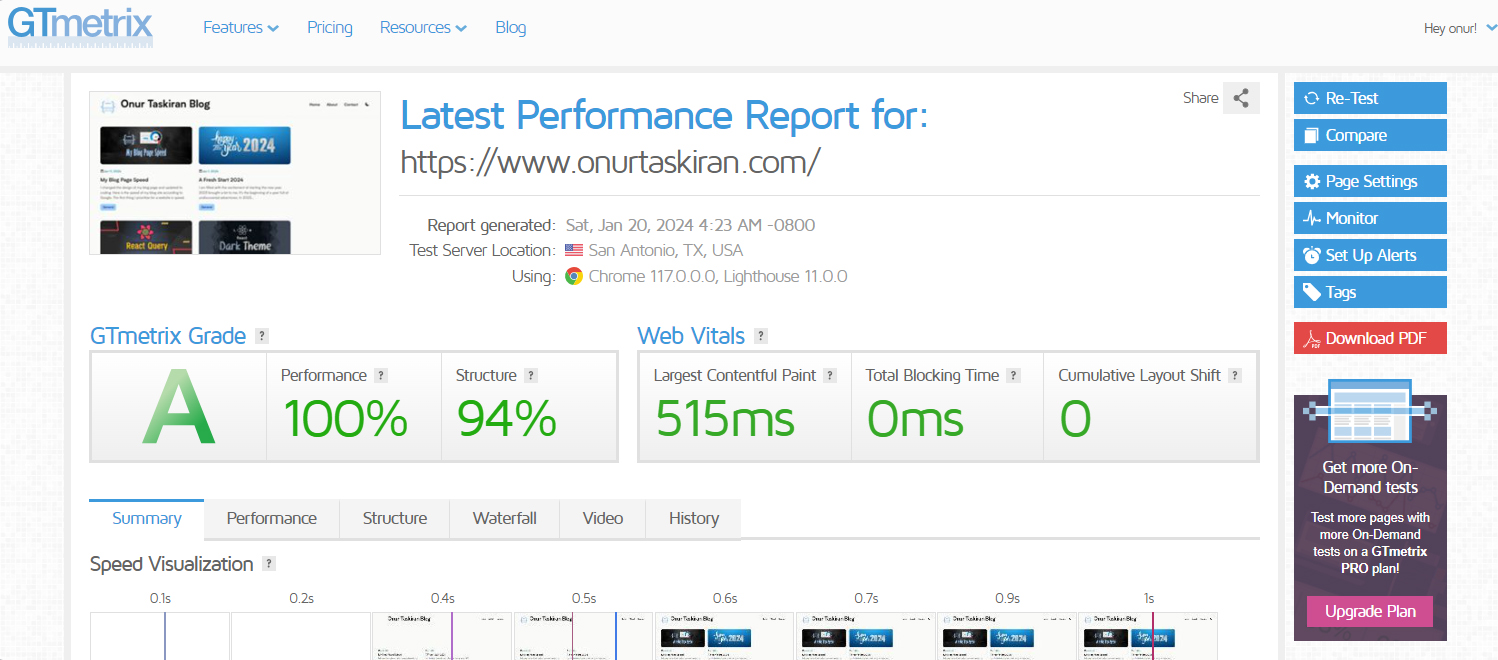
I changed the design of my blog page and updated its coding. Here is the speed of my blog site according to Google. The first thing I prioritize for a website is speed. I can even make changes to the programming languages ​​I use for this. By the way, of course I chose Next JS for my website. It's a super technology. As you can see the speed is very good. I have blog pages that open very quickly.

Here is the score given by Google:

onurtaskiran

Score given by GTmetrix

onurtaskiran

As I said, speed is important 😎

Nextjs is fast, but the strategies we use in our coding will also enable us to produce faster sites. Nextjs caches pages automatically. We can customize page cache and improve performance. We also need to adapt to new emerging technologies. For example, tailwindcss can speed up our site because it offers a smaller file size. Yes, I prefer tailwindcss instead of using normal css. By enabling HTTP/2 or HTTP/3 on your server, we can take advantage of multiple streams and other performance benefits.

Every project is different, so it is necessary to carefully determine the work that can be done to increase website speed.

Goodbye, have a nice day. Happy coding.

A Fresh Start 2024

A Fresh Start 2024

01 January 20242 min readReflections

I am filled with the excitement of starting the new year. 2023 brought a lot to me. It's the beginning of a year full of undiscovered adventures. In 2023, I dealt with challenging trainings and projects. However, it revealed my strength to deal with these challenges. Change is inevitable and I have enjoyed every moment of my life. So let's continue to enjoy Life. Here's a new year, an opportunity to set new goals for myself and present new challenges. As I do every New Year, I set new goals for myself. And each of my goals is stronger and more motivating than the previous year. This year, I plan to set achievable goals for myself and focus on them.

Of course, it is important to live in the moment. I am someone who loves life and enjoys living very much. That's why I need to collect good memories in the new year.

The software world is evolving day by day. New languages, frameworks and technologies are emerging. Learning a new language, exploring a framework, or adapting to a new technology in 2024 can make 2024 more productive. In my post last year, I said that I would learn React, and now I have learned React and I am a good React developer. Now I code my projects with React. Yes, achieving goals gives great pleasure and setting new goals is exciting.

May 2024 be a year full of hope, health and success. I wish everyone success and happiness...

React Query

React Query

07 December 20239 min readWeb Programming

React Query is an easy-to-use tool, especially in applications that require complex state management and asynchronous data exchange. The library offers a number of features to optimize data management processes in React applications. React Query facilitates operations such as fetching data from remote servers, caching and state management. Compared to setting requests with UseEffect, React Query provides a more declarative and centralized approach to data management in React; This results in cleaner and more efficient code. It also reduces boilerplate code and improves performance by minimizing unnecessary rebuilds and network requests.
We will create a simple task list management system using a Node.js application and the Express.js framework. Our application will create a web server and handle task data by responding to HTTP GET, POST, PATCH, and DELETE requests. This system will allow users to view existing tasks, add new tasks, update existing tasks, and delete tasks. Additionally, it will permit requests from different origins using CORS (Cross-Origin Resource Sharing) middleware, overcoming security policies in browser-based applications. With this simple API, we are providing a RESTful service that performs basic CRUD (Create, Read, Update, Delete) operations and offers a server-side interface for task management to users.
server.js

import express from "express";
import cors from "cors";

const app = express();
const port = 5000;

app.use(cors());
app.use(express.json());

let tasks = [
  { id: 1, title: "Task 1", isDone: false },
  { id: 2, title: "Task 2", isDone: true },
];

app.get("/", (req, res) => {
  res.send("<h1>Hello From Server...</h1>");
});

app.get("/api/tasks", (req, res) => {
  res.json({ taskList: tasks });
});

app.post("/api/tasks", (req, res) => {
  const { title } = req.body;
  const newTask = { id: tasks.length + 1, title, isDone: false };
  tasks.push(newTask);
  res.json(newTask);
});

app.patch("/api/tasks/:id", (req, res) => {
  const { id } = req.params;
  const { title, isDone } = req.body;

  const taskIndex = tasks.findIndex((task) => task.id === parseInt(id));

  if (taskIndex !== -1) {
    tasks[taskIndex] = { ...tasks[taskIndex], title, isDone };
    res.json(tasks[taskIndex]);
  } else {
    res.status(404).json({ error: "Task not found" });
  }
});

app.delete("/api/tasks/:id", (req, res) => {
  const { id } = req.params;
  tasks = tasks.filter((task) => task.id !== parseInt(id));
  res.json({ success: true });
});

app.listen(port, () => {
  console.log(`Server is running at http://localhost:${port}`);
});

This code includes an Express.js application providing basic CRUD (Create, Read, Update, Delete) operations through an API. Let's break down the code step by step:

Using Express and CORS:

import express from "express";
import cors from "cors";

const app = express();
const port = 5000;

app.use(cors());
app.use(express.json());

Imports the express and cors modules. Creates an Express application and enables CORS policies. Uses the express.json() middleware to work with JSON data.

Task Data:

let tasks = [
  { id: 1, title: "Task 1", isDone: false },
  { id: 2, title: "Task 2", isDone: true },
  // ... other tasks
];

Creates a simple array of tasks.

Home Route:

app.get("/", (req, res) => {
  res.send("<h1>Hello From Server...</h1>");
});

Sends the message "Hello From Server..." when a request is made to the home route.

Task List Route:

app.get("/api/tasks", (req, res) => {
  res.json({ taskList: tasks });
});

Returns the task list in JSON format through the /api/tasks route.

Task Addition Route:

app.post("/api/tasks", (req, res) => {
  const { title } = req.body;
  const newTask = { id: tasks.length + 1, title, isDone: false };
  tasks.push(newTask);
  res.json(newTask);
});

Handles a POST request to /api/tasks and adds a new task.

Task Update Route:

app.patch("/api/tasks/:id", (req, res) => {
  const { id } = req.params;
  const { title, isDone } = req.body;

  const taskIndex = tasks.findIndex((task) => task.id === parseInt(id));

  if (taskIndex !== -1) {
    tasks[taskIndex] = { ...tasks[taskIndex], title, isDone };
    res.json(tasks[taskIndex]);
  } else {
    res.status(404).json({ error: "Task not found" });
  }
});

Handles a PATCH request to /api/tasks/:id and updates a specific task.

Task Deletion Route:

app.delete("/api/tasks/:id", (req, res) => {
  const { id } = req.params;
  tasks = tasks.filter((task) => task.id !== parseInt(id));
  res.json({ success: true });
});

Handles a DELETE request to /api/tasks/:id and deletes a specific task. Listening to the Application:

app.listen(port, () => {
  console.log(`Server is running at http://localhost:${port}`);
});

Starts listening to the application on the specified port. This way, you've created a simple API using Express.js to perform CRUD operations.

npm install axios
npm install react-query

Query: Queries, the foundation of React Query, typically represent data fetching operations. A query includes a function (fetch function) and a key that will cache the result of this operation. An example query:

const { data, error, isLoading } = useQuery(
  "exampleQueryKey",
  fetchDataFunction,
);

Mutation: Used to modify or update data. A mutation consists of a function and an array of callback functions to handle the result of this operation.

const mutation = useMutation(updateDataFunction, {
  onSuccess: () => {
    // Actions to perform when successfully completed
  },
});

Caching: React Query enhances performance by caching data. Instead of sending a network request every time the same data is accessed, it retrieves the data from the cache.

App.js

import React from "react";
import { QueryClient, QueryClientProvider } from "react-query";
import TaskList from "./components/TaskList";

const queryClient = new QueryClient();

function App() {
  return (
    <QueryClientProvider client={queryClient}>
      <div>
        <TaskList />
      </div>
    </QueryClientProvider>
  );
}

export default App;

The QueryClientProvider component is used to provide the queryClient to all child components. This enables child components to manage data and utilize the React Query library.

TaskList.js

import React from "react";
import { useQuery, useMutation, useQueryClient } from "react-query";
import axios from "axios";

const fetchTasks = async () => {
  const response = await axios.get("http://localhost:5000/api/tasks");
  return response.data;
};

const createTask = async (newTask) => {
  const response = await axios.post("http://localhost:5000/api/tasks", newTask);
  return response.data;
};

const updateTask = async (updatedTask) => {
  console.log("Update Task:", updatedTask);

  const response = await axios.patch(
    `http://localhost:5000/api/tasks/${updatedTask.id}`,
    updatedTask,
  );
  return response.data;
};

const deleteTask = async (taskId) => {
  const response = await axios.delete(
    `http://localhost:5000/api/tasks/${taskId}`,
  );
  return response.data;
};

const TaskList = () => {
  const queryClient = useQueryClient();

  const { data: tasks, isLoading } = useQuery("tasks", fetchTasks);

  const createMutation = useMutation(createTask, {
    onSuccess: () => {
      queryClient.invalidateQueries("tasks");
    },
  });

  const updateMutation = useMutation(updateTask, {
    onSuccess: () => {
      queryClient.invalidateQueries("tasks");
    },
  });

  const deleteMutation = useMutation(deleteTask, {
    onSuccess: () => {
      queryClient.invalidateQueries("tasks");
    },
  });

  const handleCreate = () => {
    const taskName = prompt("Enter task name:");
    if (taskName) {
      createMutation.mutate({ title: taskName });
    }
  };

  const handleUpdate = (task) => {
    console.log("Task:", task);

    const updatedName = prompt("Enter the updated name:", task.title);
    const isDone = prompt("Is the task done? (true/false)", task.isDone);

    if (updatedName !== null && isDone !== null) {
      updateMutation.mutate({
        id: task.taskId,
        title: updatedName,
        isDone: JSON.parse(isDone),
      });
    }
  };

  const handleDelete = (taskId) => {
    if (window.confirm("Are you sure you want to delete this task?")) {
      deleteMutation.mutate(taskId);
    }
  };

  if (isLoading) {
    return <div>Loading...</div>;
  }

  return (
    <div>
      <h1>Task List</h1>
      <button onClick={handleCreate}>Add Task</button>
      <ul>
        {tasks.taskList.map((task) => (
          <li key={task.id}>
            {task.title}
            <button
              onClick={() =>
                handleUpdate({
                  taskId: task.id,
                  title: task.title,
                  isDone: !task.isDone,
                })
              }>
              Update
            </button>
            <button onClick={() => handleDelete(task.id)}>Delete</button>
          </li>
        ))}
      </ul>
    </div>
  );
};

export default TaskList;

This React application creates a task list using React Query and Axios. Axios is used for making HTTP requests, while React Query manages tasks by handling caching, updates, and storage in the cache. The application includes functions for fetching, adding, updating, and deleting tasks. The task list is displayed in the user interface, providing options for updating and deleting each task. Event handlers interact with user input to perform operations, enabling the application to work interactively.

Import Statements:

import React from "react";
import { useQuery, useMutation, useQueryClient } from "react-query";
import axios from "axios";

useQuery, useMutation, and useQueryClient are React Query hooks for managing queries and mutations. axios is a popular library for making HTTP requests.

Async Functions for API Requests:

const fetchTasks = async () => {
  const response = await axios.get("http://localhost:5000/api/tasks");
  return response.data;
};

const createTask = async (newTask) => {
  const response = await axios.post("http://localhost:5000/api/tasks", newTask);
  return response.data;
};

const updateTask = async (updatedTask) => {
  const response = await axios.patch(
    `http://localhost:5000/api/tasks/${updatedTask.id}`,
    updatedTask,
  );
  return response.data;
};

const deleteTask = async (taskId) => {
  const response = await axios.delete(
    `http://localhost:5000/api/tasks/${taskId}`,
  );
  return response.data;
};

fetchTasks: Sends a GET request to retrieve tasks.

createTask: Sends a POST request to create a new task.

updateTask: Sends a PATCH request to update an existing task.

deleteTask: Sends a DELETE request to delete a task.

TaskList Component:

const TaskList = () => {
  // ...
};

Initializes the useQueryClient hook for managing the query cache.

useQuery Hook:

const { data: tasks, isLoading } = useQuery("tasks", fetchTasks);

Uses the useQuery hook to fetch tasks. The query key is 'tasks', and it invokes the fetchTasks function.

useMutation Hooks:

const createMutation = useMutation(createTask, {
  onSuccess: () => {
    queryClient.invalidateQueries("tasks");
  },
});

const updateMutation = useMutation(updateTask, {
  onSuccess: () => {
    queryClient.invalidateQueries("tasks");
  },
});

const deleteMutation = useMutation(deleteTask, {
  onSuccess: () => {
    queryClient.invalidateQueries("tasks");
  },
});

createMutation, updateMutation, and deleteMutation are mutation hooks. They handle the creation, updating, and deletion of tasks, respectively.

onSuccess callbacks invalidate the 'tasks' query in the cache, triggering a refetch.

Event Handlers:

const handleCreate = () => {
  // ...
};

const handleUpdate = (task) => {
  // ...
};

const handleDelete = (taskId) => {
  // ...
};

handleCreate: Prompts the user for a task name and calls createMutation to add a new task.

handleUpdate: Prompts the user for updated task information and calls updateMutation to modify the task.

handleDelete: Asks for confirmation before calling deleteMutation to remove a task.

Rendering:

if (isLoading) {
  return <div>Loading...</div>;
}

return <div>{/* ... */}</div>;

Displays a loading message if data is still being fetched. Renders the main component structure if data is available.

This refactored code uses Axios for HTTP requests and React Query for managing state and caching. The use of hooks and the modular structure make the code more readable and maintainable.

In this way, a task management application is created using React Query to effectively manage data fetching, adding, updating, and deleting operations.

Happy Coding

Dark Theme in React

Dark Theme in React

06 December 20234 min readWeb Programming

Dark mode is a display mode in which the user interface of a website or application is usually designed with dark colors instead of light colors. This mode is generally preferred in low light conditions or when users want to experience less eye strain. Users can usually choose their preferred mode. Some websites and apps offer a "dark mode" option that allows users to save this preference and automatically use the same mode on subsequent visits. Enabling or disabling this mode can usually be done via a button or the settings menu.

Dark mode can improve user experience and protect users' eyes, especially during night use or low light conditions. Additionally, using dark colors may offer a more stylish or modern look for some users. For this reason, many websites and applications try to appeal to a wide range of users by offering users the dark mode option.

Let's install the react-icons npm package for moon and sun icons.

npm install react-icons

App.js

import React from "react";
import { useTheme } from "./ThemeContext";
import { BsFillSunFill, BsFillMoonFill } from "react-icons/bs";
import "./App.css";

const App = () => {
  const theme = useTheme();

  return (
    <div className="App">
      <header>
        <h1>React Dark Theme</h1>
        <button className="dark-toggle" onClick={theme.toggleDarkMode}>
          {theme.isDarkMode ? (
            <BsFillMoonFill className="toggle-icon-moon" />
          ) : (
            <BsFillSunFill className="toggle-icon-sun" />
          )}
        </button>
      </header>
    </div>
  );
};

export default App;

ThemeContext.js:

Create a context named ThemeContext. The useTheme hook utilizes ThemeContext to retrieve information about the theme. The ThemeProvider component uses useEffect to add or remove the dark-mode class based on the isDarkMode state. The toggleDarkMode function changes the theme and persists the change in localStorage.

import React, { createContext, useContext, useEffect, useState } from "react";

const ThemeContext = createContext();

export const useTheme = () => {
  return useContext(ThemeContext);
};

export const ThemeProvider = ({ children }) => {
  const storedTheme = localStorage.getItem("isDarkMode");
  const [isDarkMode, setDarkMode] = useState(
    storedTheme ? JSON.parse(storedTheme) : false,
  );

  const toggleDarkMode = () => {
    setDarkMode((prevMode) => {
      const newMode = !prevMode;
      localStorage.setItem("isDarkMode", JSON.stringify(newMode));
      return newMode;
    });
  };

  useEffect(() => {
    document.body.classList.toggle("dark-mode", isDarkMode);
  }, [isDarkMode]);

  const theme = {
    isDarkMode,
    toggleDarkMode,
  };

  return (
    <ThemeContext.Provider value={theme}>{children}</ThemeContext.Provider>
  );
};

Header.js

Use the useTheme hook to obtain the theme variable. Add a title and a button. When the button is clicked, call the toggleDarkMode function to change the theme.

import React from "react";
import { useTheme } from "./ThemeContext";

function Header() {
  const theme = useTheme();

  return (
    <header
      style={{ backgroundColor: theme.primaryColor, color: theme.textColor }}>
      <h1>Uygulama Başlığı</h1>
      <button onClick={theme.toggleDarkMode}>
        {theme.isDarkMode ? "Light Mode" : "Dark Mode"}
      </button>
    </header>
  );
}

export default Header;

index.js

Use the ThemeProvider at the top level of your application to share your theme globally. Use the ReactDOM.render function to attach your App component, wrapped in the ThemeProvider, to an HTML element named root.

import React from "react";
import ReactDOM from "react-dom/client";
import "./index.css";
import App from "./App";
import { ThemeProvider } from "./ThemeContext";

const root = ReactDOM.createRoot(document.getElementById("root"));
root.render(
  <React.StrictMode>
    <ThemeProvider>
      <App />
    </ThemeProvider>
  </React.StrictMode>,
);

App.css

Contains style definitions related to the theme.Contains style definitions related to the theme.

body {
  margin: 0;
  font-family: -apple-system, BlinkMacSystemFont, 'Segoe UI', Roboto, 'Helvetica Neue', Arial, sans-serif;
}

.dark-mode {
  background-color: #333;
  color: #fff;
}

.toggle-icon-moon {
  font-size: 1.5rem;
  color: #fff;
}

.toggle-icon-sun {
  font-size: 1.5rem;
  color: #000;
}

.dark-toggle {
  background: transparent;
  border-color: transparent;
}
onurtaskiran

Our code includes a theme management that essentially creates a "dark mode" application. This example is a very instructive example to understand the concept of theme management.

Happy coding.

12 Angry Men

12 Angry Men

05 December 20232 min readCinema

12 men in one room. It's a great movie. A movie that appeals to your mind. The actors are much more natural than today's actors, and the characters they portray are sincere and realistic. The movie runs for over an hour and a half and there is no action, just conversation. The acting is so natural that it's as if they improvised the entire movie. It is truly impressive that the director created a masterpiece with so little. When examined from a philosophical perspective, the film deals with the justice system and ethical issues in depth.

The process of evaluating jurors' decisions from an ethical perspective makes the viewer think about the subjective and objective dimensions of justice.

The fact that the jury members come from different backgrounds causes them to confront social prejudices and stereotypes throughout the film. This makes the viewer think about how people should get rid of prejudices that can affect their decisions.

The juror, played by Henry Fonda, acts under the guidance of his individual conscience. The film questions how the individual's inner values ​​and conscience stand against society's expectations.

Jurors question the evidence presented, and in the process, epistemological questions arise about the difficulties of understanding the truth. The issues of what information is reliable and how the truth is determined play an important role in the film.

onurtaskiran

The fact that the jury is a democratic institution causes the film to question democratic processes and decision-making mechanisms. Issues such as the difficulties of democracy, majority oppression and minority rights are discussed in the film.

The characters in the film face their own freedom and responsibility for their decisions.

The film directs the audience to think about basic philosophical issues such as social problems, justice, ethics, freedom and responsibility.

Hardcore Henry

Hardcore Henry

03 December 20232 min readCinema

The movie is told through the eyes of the leading actor. So it is like you're playing a computer game. I really felt like I was at the beginning of a computer game when I first watched it. Making such a film is undoubtedly a brave act. If you are a computer games enthusiast, this is the kind of movie you will love. Yes, the camera is on our man's face and you watch the movie from there. What a crazy movie I liked it very much and watched it 3 times. I don't easily watch a movie a second time.

Some people made ridiculous comments such as I was very dizzy, my head hurt, there was no plot and there was too much action. I don't believe that people who love technology will think like this. Those who criticize are generally people who are far from technology or are old people.

onurtaskiran

The movie is very successful and a must-watch movie. It may not have a very good plot, but it is a top-notch movie in terms of action scenes. I've never watched a movie before that was reflected only through the eyes of the leading actor. I also think that movies like this will increase. Even if there are no such movies in the future, some of its scenes can be reflected this way.

Even if you watch the trailer, you will understand that it is beautiful.

I suggest you watch it, bye

onurtaskiran

Storyline: Waking inside a laboratory on an airship, a man recalls bullies from his childhood. A scientist, Estelle, greets him and tells him his name is Henry, she is his wife, and that he has been revived from an accident that left him amnesiac and mute. After she replaces a missing arm and leg with cybernetic prostheses, mercenaries led by the psychokinetic Akan raid the ship, claiming all of Estelle's research is Akan's corporate property. He kills Estelle's scientists before attempting to murder Henry, but Henry and Estelle flee in an escape pod, landing in Moscow. Estelle is abducted by the mercenaries, who try to kill Henry..

Pushing Code to Github

Pushing Code to Github

02 December 20233 min readWeb Programming

Managing software development projects and collaborating with other software developers is very important. Using GitHub for managing and collaborating on projects is very popular. GitHub allows users to host their projects, perform version control, and collaborate with other users. GitHub is a common collaboration platform for open source projects, but also supports private projects. It is used to make the software development processes of both individuals and large companies more effective and collaborative.

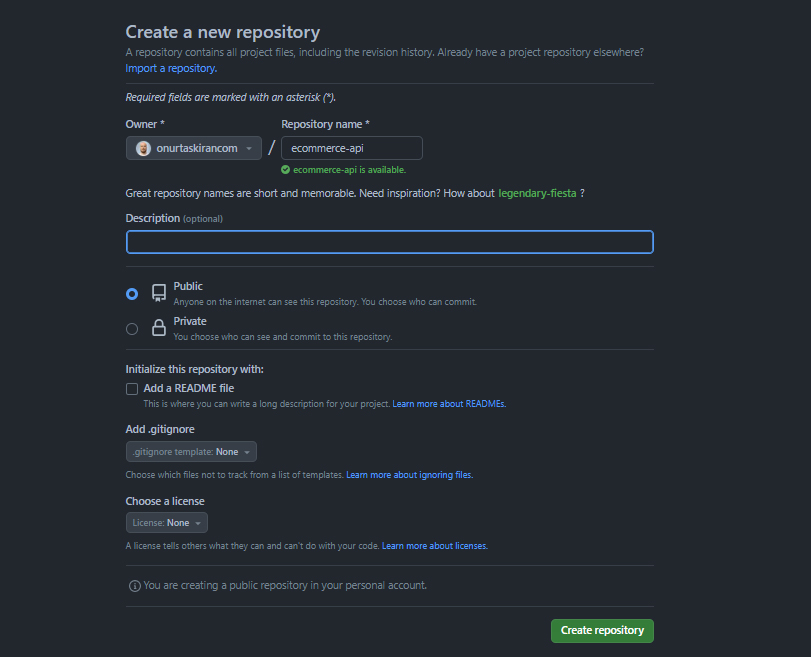
If you don't have an account, I recommend going to GitHub and creating one. Creating an account on GitHub is quite simple. How will we push our code to GitHub? This process is very simple. First, we go to GitHub and log in. Then we click create a new repository in a control panel.

onurtaskiran

Determine and create a repository name

onurtaskiran

The important thing here is to create the .gitignore file. We don't want to deploy everything from our projects to the GitHub repository. For example, we add node_modules to .gitignore.

/node_modules

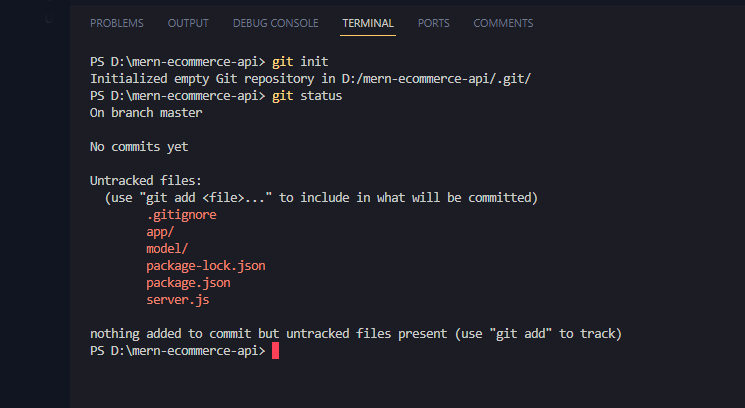
Now let's continue with the commands. The first command is git init.

git init

The second command is git status

git status
onurtaskiran

Notice there is no node module here. Git status will be listed. Now you can transfer all your files and folders to the GitHub repository.

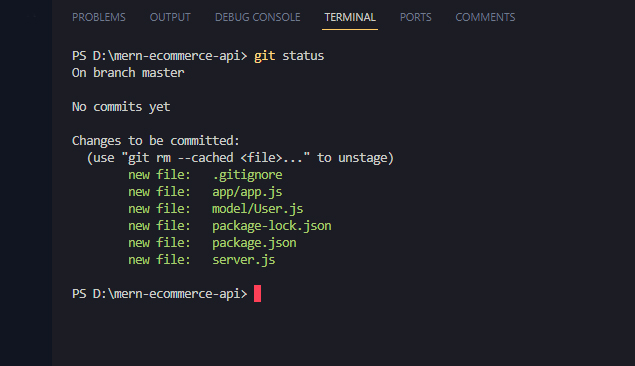
Our next command

git add .

It means I want to include all files. We execute the git status command again.

git status
onurtaskiran

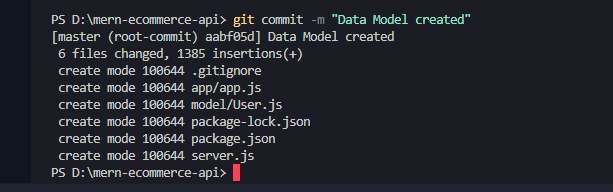
All files should now be green so they are ready to be processed. Our next command will be writing a commit message. The message must be meaningful for your project

git commit -m "Data Model created"
onurtaskiran
git status
onurtaskiran

Here you will see that there is nothing to commit in Branch Master.

git branch -M master

Next code

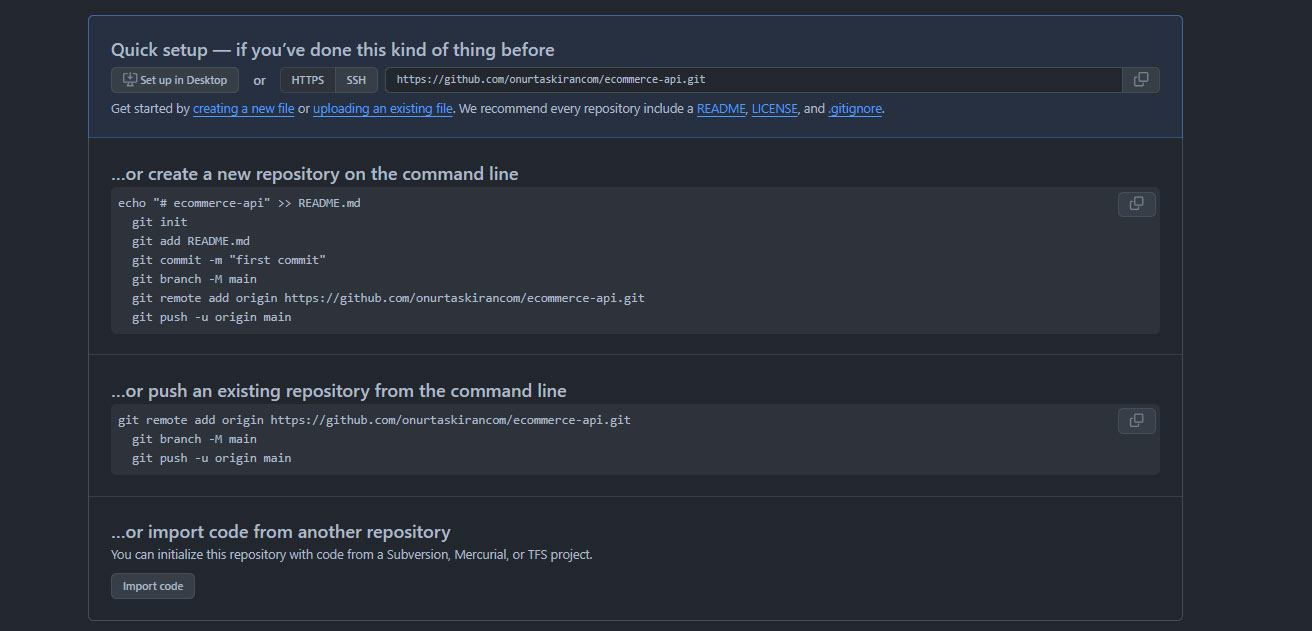
git remote add origin https://github.com/onurtaskirancom/ecommerce-api.git

Go here and type remote -v and you will see that you have a remote branch.

git remote -v
onurtaskiran

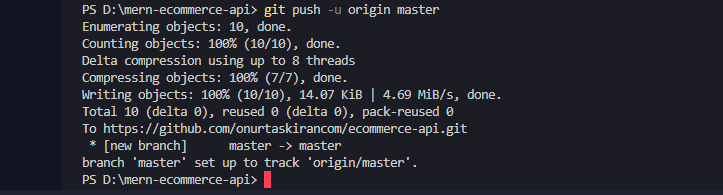
Now our local code and remote repository are connected. Now we can push our code to GitHub repository with git command.

git push -u origin master
onurtaskiran

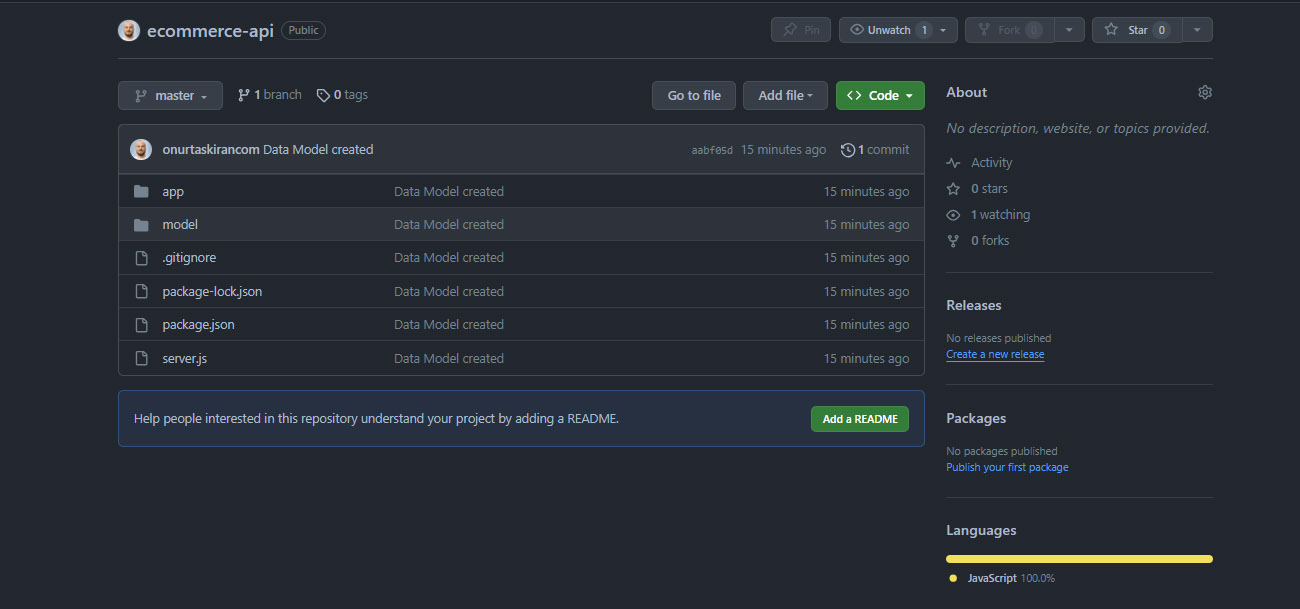
All of our code has been pushed to GitHub. I go to the browser and I should see your code here.

onurtaskiran

This is perfect

The commands I wrote respectively.

git init
git status
git add .
git status
git commit -m "first commit"
git status
git branch -M master
git remote add origin https://github.com/onurtaskirancom/MernEcommerceApi.git
git remote -v
git push -u origin master

Happy coding.

Peaky Blinders

Peaky Blinders

01 December 20232 min readCinema

I can say that it is one of the quality TV series I have watched. The first season of the series progresses a little slowly, but as it progresses, it becomes legendary. The acting is really good. Tommy Shelby, played by Cillian Murphy, is the gang leader and the brains of the Shelbys, who makes very clever moves. His older brother, Arthur, is lacking in intelligence, but we can say that he is the fist of the Shelbys in terms of strength and nerves. At first, Arthur is shown to be the leader, but it is Tommy who leads the Shelbys. Then Tommy will take full leadership. Tommy gains the sympathy of the audience with his clever moves. His brother Arthur is not a idle man either, he endears himself to the audience with his aggressive, rebellious and predatory attitudes.

The series takes place in the last half of the nineteenth century and the beginning of the twentieth century. They reflected the period they wanted to describe in terms of costumes, objects and environment very well on the screen.

onurtaskiran

Shelbys are famous for the razor blades they wear on their hats. When they fight, they blind their opponents with their hats. The Peaky Blinders gang is not fictional. It is based on events that have happened before. In this case, it makes the series different.

We see Tom Hardy as the Jewish mafia in the series. By the way, Tom Hardy is the best actor for me after Marlon Brando and Steve McQueen.

onurtaskiran

In the following episodes, Adrien Brody, whom we know from the movie The Pianist, appears before the Shelbys as the Italian Mafia. Especially the Shelbys' war with the Italians was full of action and excitement.

Do yourself a favor and give this show a chance

Storyline:

Thomas Shelby and his brothers return to Birmingham after serving in the British Army during WWI. Shelby and his gang, the Peaky Blinders, control the city of Birmingham. However, Shelby's ambitions extend beyond Birmingham, as he plans to build on the business empire he's created, and dispatch anyone who gets in his way.